There are no items in your cart
Add More
Add More
| Item Details | Price | ||
|---|---|---|---|

I usually encourage everyone to use AI tools in their daily work, and right now, one of the most talked-about tools is Claude AI, which is getting a lot of attention everywhere. You will see every other reel talking about Claude and how it can help you do almost anything.
It is genuinely a powerful tool, especially for digital marketers. And the biggest challenge we face is Meta Ads. The good part is you do not have to struggle with it the same way anymore because you can connect Claude with your Meta Ads account and use it to understand and improve your campaigns much faster using something called MCP, which stands for Model Context Protocol.
If I were to tell you in simple terms, it's a way for Claude to talk to external tools without you needing to set up any developer app or touch any API credentials.
It's a no-code solution that even a 15-year-old can set up, so let's not waste any more of our time and jump straight into the topic. And as always, thanks for reading.
How to Connect Claude with Meta Ads
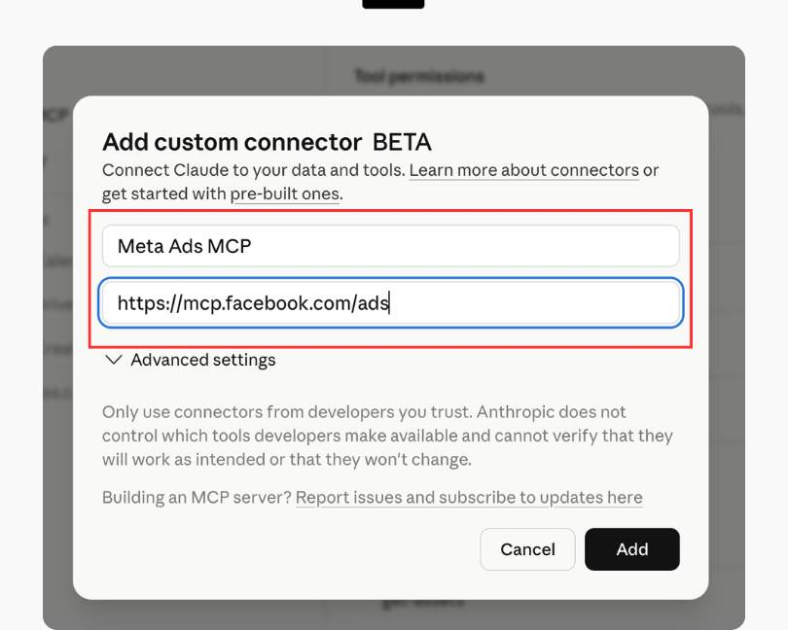
Give it a name like "Meta Ads" so you can find it later. Then click Add. That URL is Meta's official MCP server for ads. When you add it, you are basically telling Claude where your Meta ads data is located.
Claude doesn't store anything on its own, so what it will do is it will talk to Meta's server in real time whenever you ask it something about your.
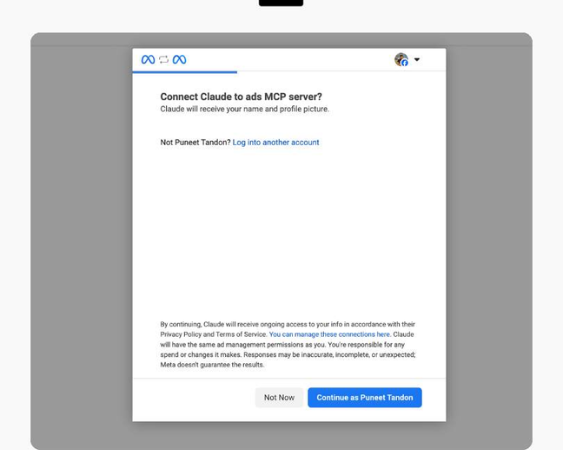
Step 3: Log in to Facebook and allow access
If you manage multiple business accounts, use the one that has the broadest access to the accounts you want to connect. Once you are logged in, Facebook will show you a permissions screen. It lists specifically what Claude is requesting access to: campaign data, performance metrics, account information, that kind of thing.
Read it or not its your wish, but for the process to continue, click Allow. Claude can now pull your data and analyze it, but it can't create campaigns, change budgets, or launch anything. Nothing goes live without you doing it manually from Ads Manager. Meta built it that way on purpose.
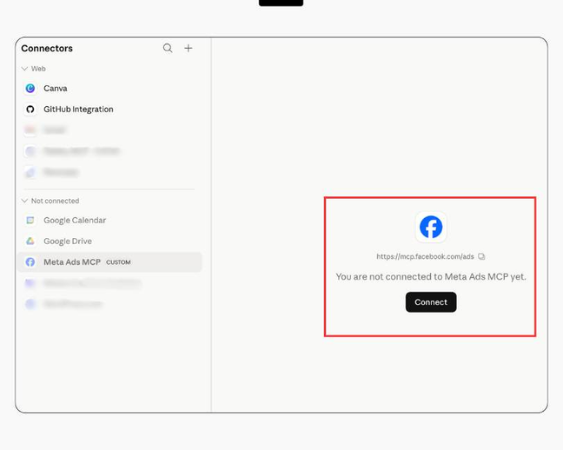
Step 4: Pick your Ad accounts
Step 5: Check your connector
READ MORE: Why is Facebook Ads Not Spending Money?
What You Can Actually Do Now?
This is the giggity part, I mean, the part worth your actual attention. Here is what you can do now with your Claude AI after connecting with your ads manager.
Ask about campaign performance.
Something like "which campaigns had the best ROAS last month?" Claude pulls the numbers, ranks them, and explains what's driving the difference. Not a table you have to interpret yourself. An actual answer.
Figure out where the budget should go
If you are looking at five campaigns and trying to decide which ones to scale, you can walk through it conversationally. "These three are within my target CPA. Which one has the most room before frequency gets too high?" Claude can work through that with you using your real data.
Dig into CTR and CPM without exporting anything
Compare creatives
This one doesn't get enough attention. If you're running five ad variations and want to know which image-and-copy combo is actually working, Claude can compare them and explain the gap in plain language. Not a spreadsheet. A conversation.
Check spend pacing before a client call
"How is budget tracking across my active campaigns this week?" Thirty seconds instead of five minutes of clicking.
The whole setup takes about five minutes, almost the same as making Maggie. What's also worth knowing: this isn't some unofficial workaround. Meta launched this officially in 2026.
That's why using it doesn't put your ad account at risk or violate any policies. This was a real reason why early accounts got banned through unofficial API access.
If you run ads seriously, the gap between digging through Ads Manager manually and just asking Claude what's going on is bigger than it sounds until you have used it a few times. So, all the best for your own Meta ads journey, and do try this once; trust me, you will thank me later.
These kinds of ad spend-related glitches are fixed within a day or two max, and after that, you can resume running your ads normally.

DAMINI TRIPATHI
Damini Tripathi, rocking the digital marketing scene for 7 awesome years. Started from scratch, now running my digital marketing agency and creating cool content too. She has been one of the fastest-growing digital marketers on the internet. Damini has also scaled multiple clients from ZERO —> HERO.